 Affiliate Product Vault
Chrome extension for creators
A private vault for the products you recommend
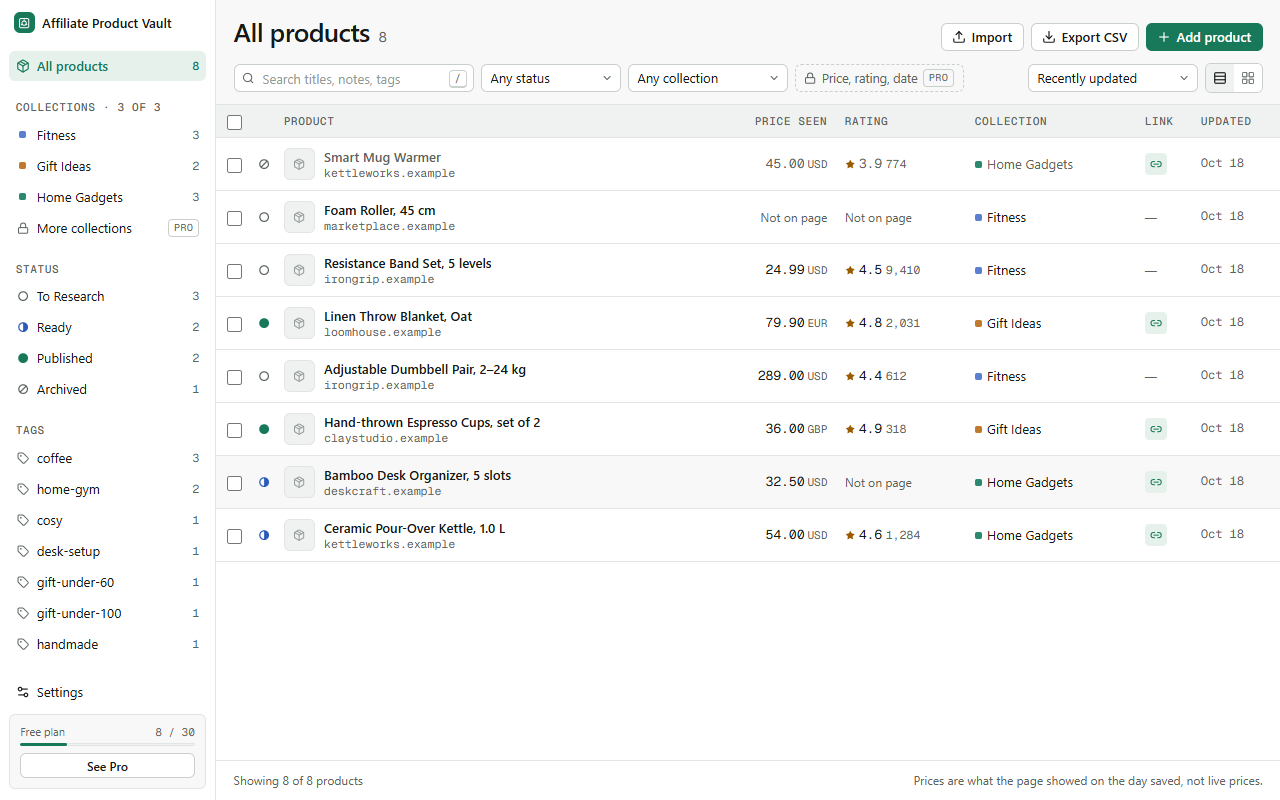
Save products while you browse, sort them into collections for your next video, post or newsletter, keep your own affiliate links with them, and export everything to a spreadsheet. It all stays in your browser.
How it works
From product page to content plan in three steps
-
1
Click the icon on a product page
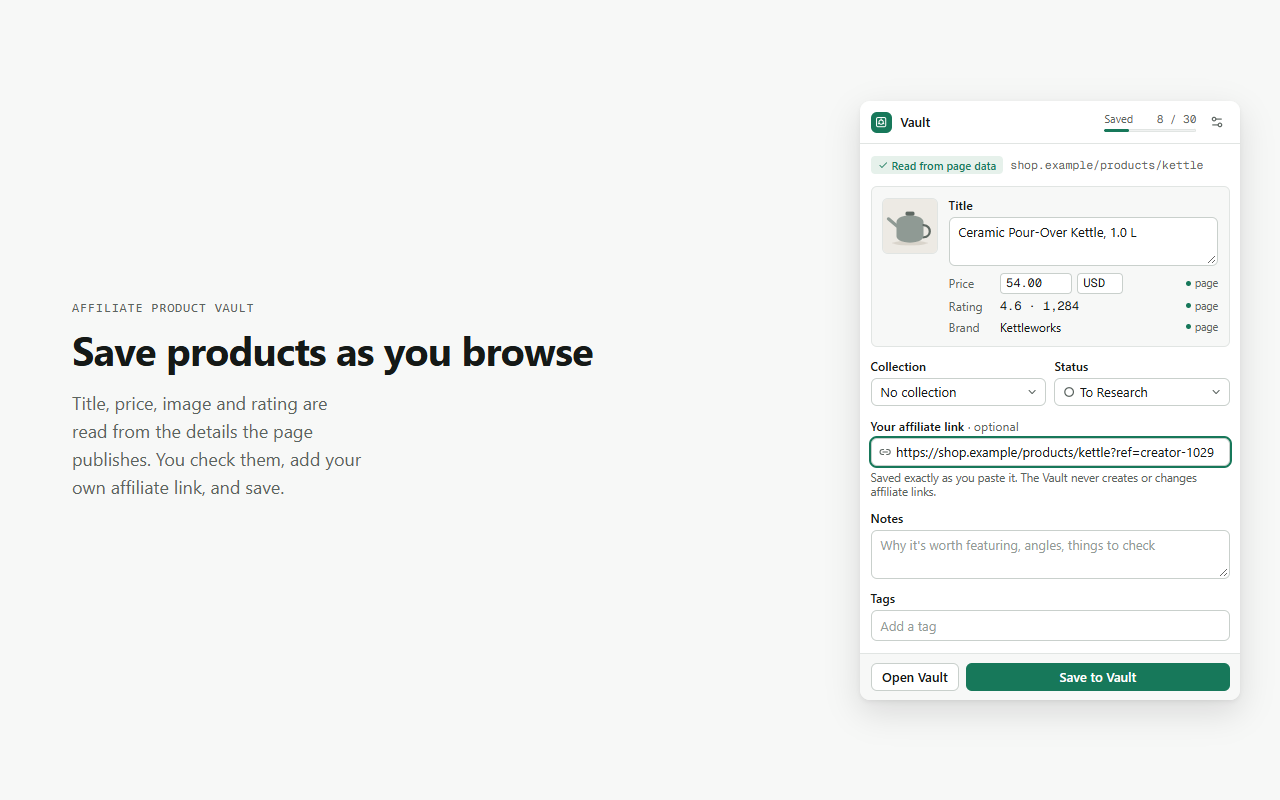
The Vault reads the details the page publishes about itself (title, price, image, rating, brand) and fills them in for you to check.
-
2
Add your angle
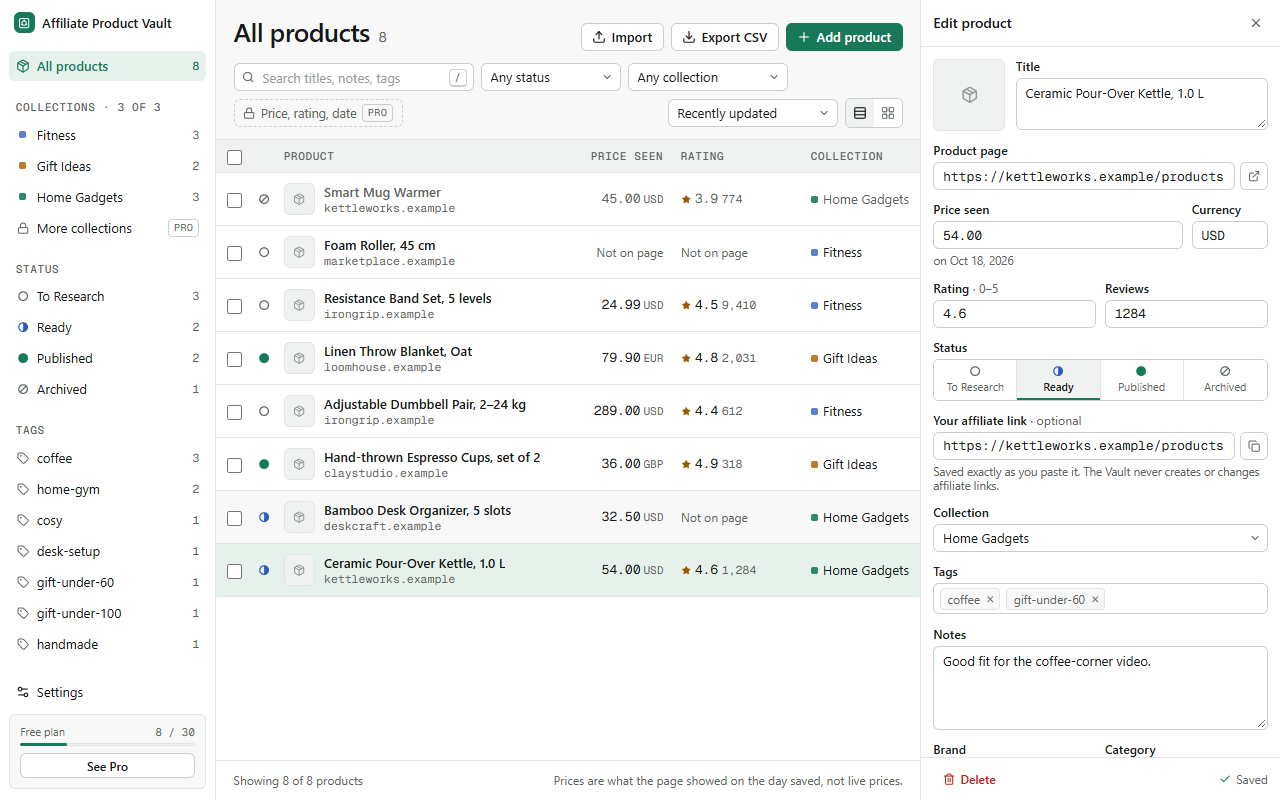
Paste your affiliate link, jot notes, tag it, and drop it in a collection like Gift Ideas or Desk Setup.
-
3
Plan, publish, export
Move products from To Research to Ready to Published, then export a collection to CSV for your sheet, site or newsletter.
Features
Built for the way creators actually research
Duplicate warnings
Save a page you already have, even with different tracking codes in the link, and you're told before you save it twice.
Status pipeline
To Research, Ready, Published, Archived. Each has its own shape, so you can scan a list at a glance.
Price snapshots
Prices are kept as "price seen on" a date, never presented as live prices.
CSV in and out
Export everything or one collection. Re-import your exports any time. Pro maps columns from other tools' files.
Private by design
Your list is yours
- Products are stored in this browser only. There is no account and no server, and nothing you save is uploaded.
- A page is read only when you click the icon, and only that page.
- The Vault never adds, changes or injects affiliate links or cookies. You paste your own.
- No analytics or tracking. The only network request is the licence check with Gumroad, if you buy Pro.
- No install warnings. It asks only for activeTab, scripting and storage.
Pricing
Free to use. Pro once, for life.
The free plan is the full workflow for up to 30 products. Pro is a single payment through Gumroad, with no subscription.
| Feature | Free | Pro |
|---|---|---|
| Saved products | 30 | Unlimited |
| Collections | 3 | Unlimited |
| Capture, notes, tags, status pipeline | ✓ | ✓ |
| Duplicate warnings, search, basic filters | ✓ | ✓ |
| CSV export (all or one collection) | ✓ | ✓ |
| Re-import your own exports | Up to 30 | ✓ |
| Price, rating and date filters; saved filters | — | ✓ |
| Bulk status, move, tag, export, delete | — | ✓ |
| Custom fields and campaign tags | — | ✓ |
| Import any CSV with column mapping | — | ✓ |
| Full backup and restore | — | ✓ |
| Compare up to 4 products side by side | — | ✓ |
Reaching the free limit never deletes or hides anything. You can still view, edit, export and delete every product; only adding new ones waits for a free slot or Pro.
After you buy
Activate Pro in under a minute
-
1
Copy the licence key from your Gumroad receipt email. Lost it? Get it again at gumroad.com/license-key-lookup.
-
2
In Chrome, open the Vault (click the icon, then Open Vault) and choose Settings → Licence, or See Pro in the side bar.
-
3
Paste the key and press Activate. Pro unlocks straight away. Repeat on any other computer where you use the Vault.
FAQ
Questions
Does it work on every shop?
It works best on shops that publish product details in their pages, which is common for independent stores (Shopify and similar). Some large marketplaces publish very little. Then the Vault saves the title and link, and you add the price and image yourself. It never bypasses logins, paywalls or bot checks.
Does it create or insert affiliate links?
No. You paste links from your own affiliate programmes, and the Vault stores them exactly as pasted. It never changes links, codes or cookies on any site.
Does it track prices?
No. It saves the price the page showed when you saved it, with the date. Affiliate programmes have their own rules about publishing prices, so check yours before posting.
Where is my data, and can I back it up?
In your browser only. Export to CSV any time on the free plan; Pro adds a full JSON backup you can restore elsewhere. Uninstalling the extension removes its data, so export first.
What does "lifetime" mean?
One payment unlocks Pro in Affiliate Product Vault, including all future updates to this extension, for as long as it's offered. It doesn't include other extensions or any paid services.
Does Pro need the internet?
Only to activate and for an occasional re-check, at most every 14 days. If Gumroad can't be reached, Pro keeps working for 60 days after the last successful check.
Can I get a refund?
Yes. Pro has a 30-day money-back guarantee. Reply to your Gumroad receipt within 30 days of buying and you'll get a full refund.
I lost my key or it won't activate.
Your receipt email and Gumroad library both have the key. Make sure it's the key for Affiliate Product Vault and not another product. Still stuck? Contact aazzouz@outlook.fr.